Product Screenshots
Built for Security &
Compliance Teams
Explore example screens for vulnerability review, project management, license analysis, and risk trends. Screenshots use sample data.
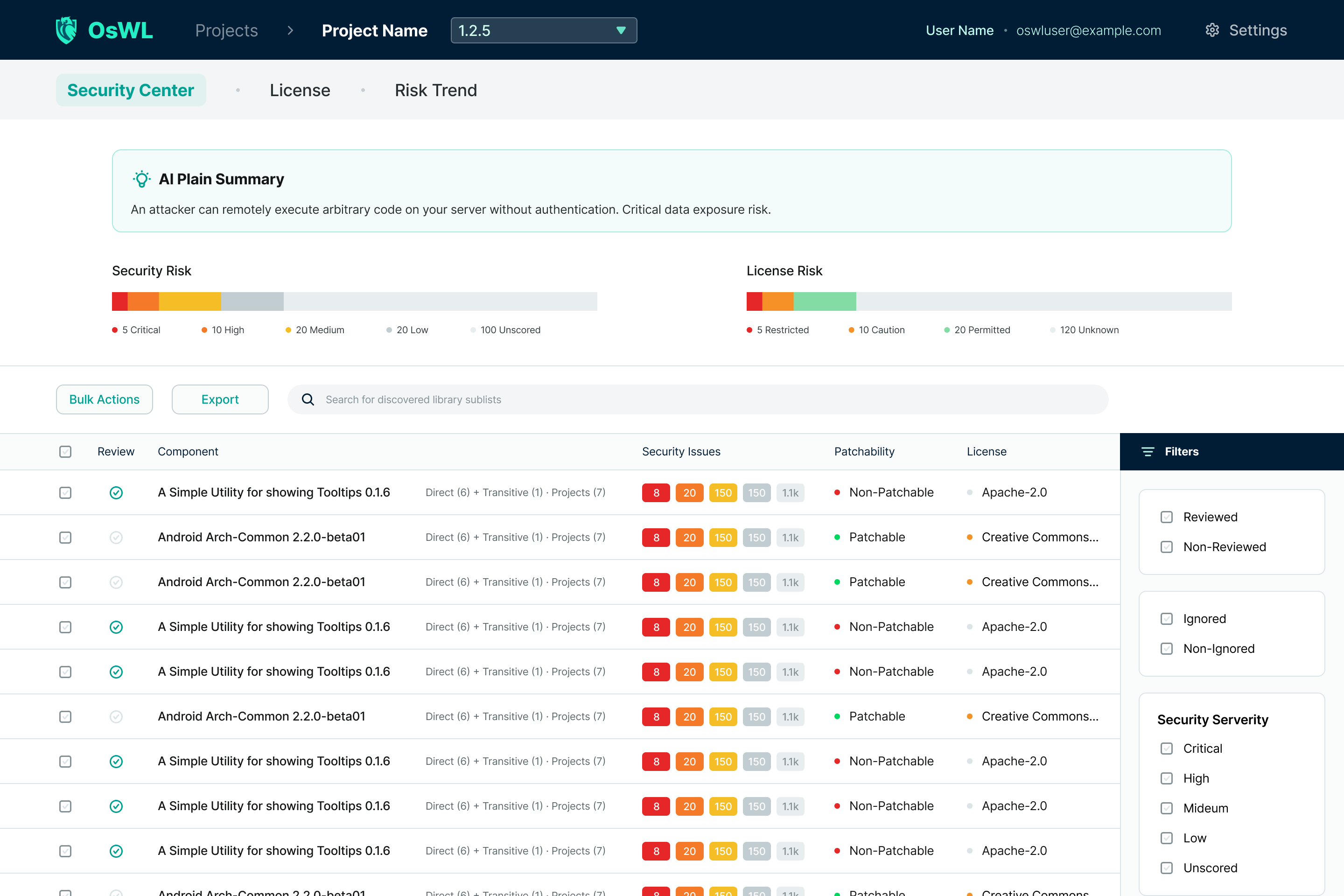
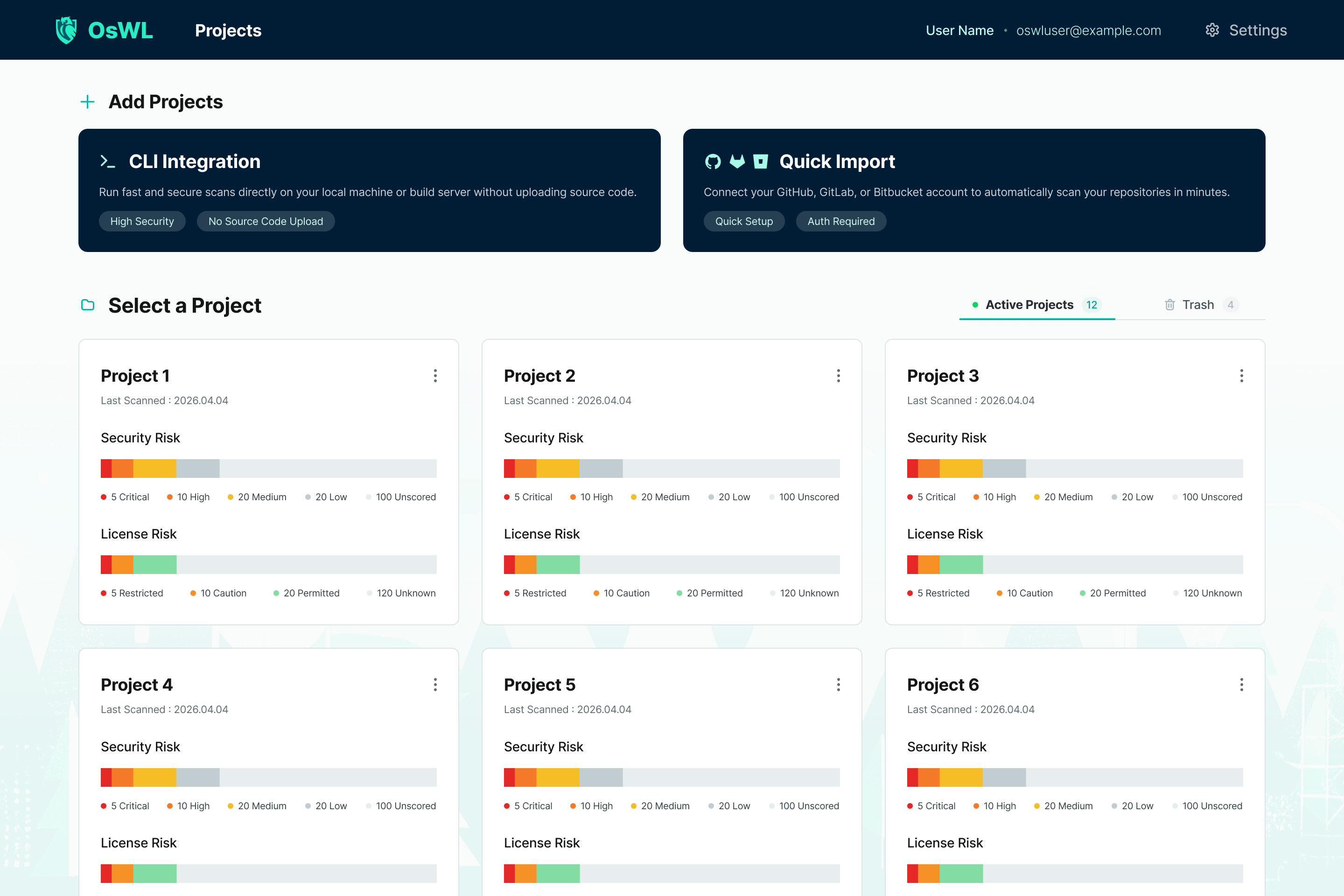
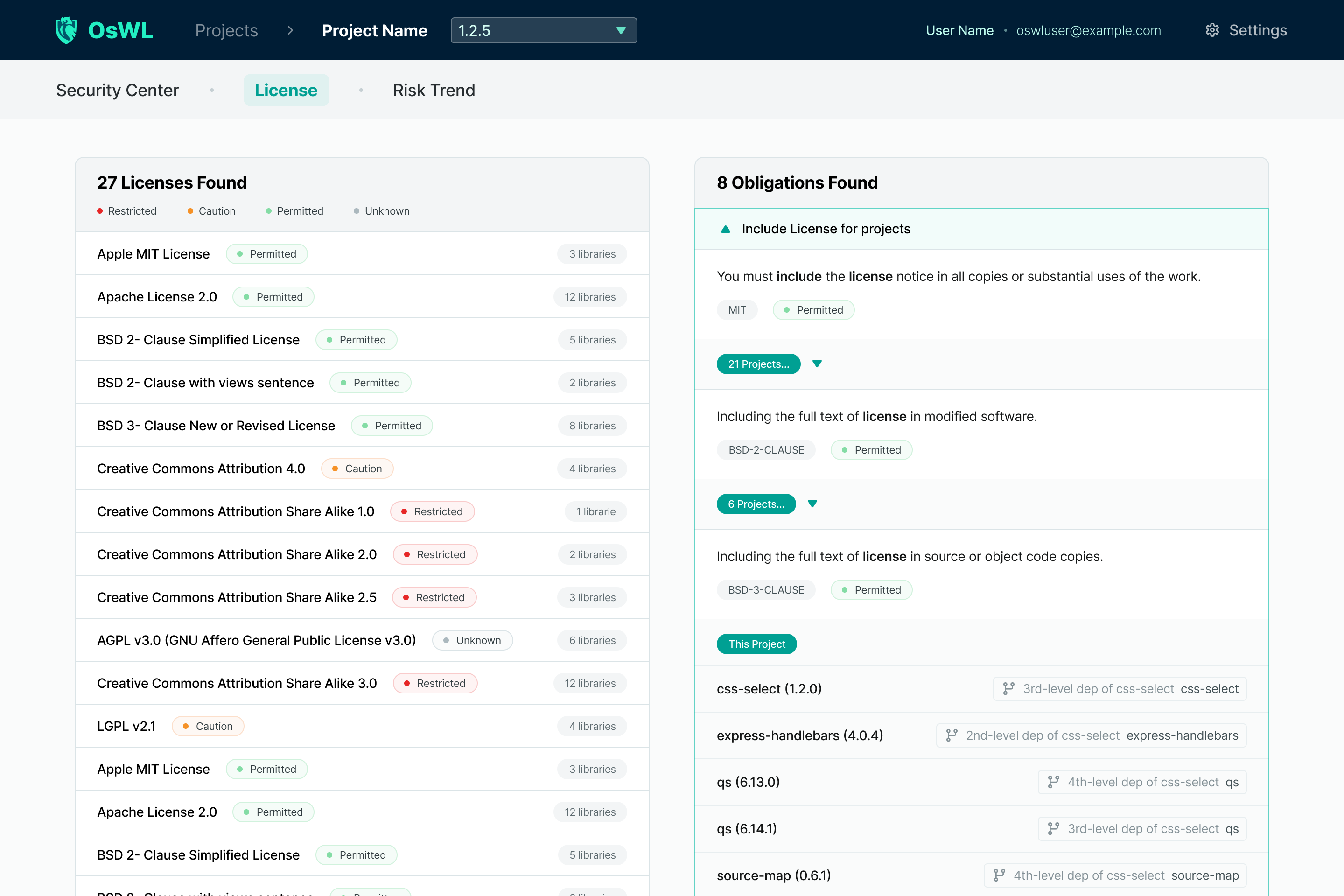
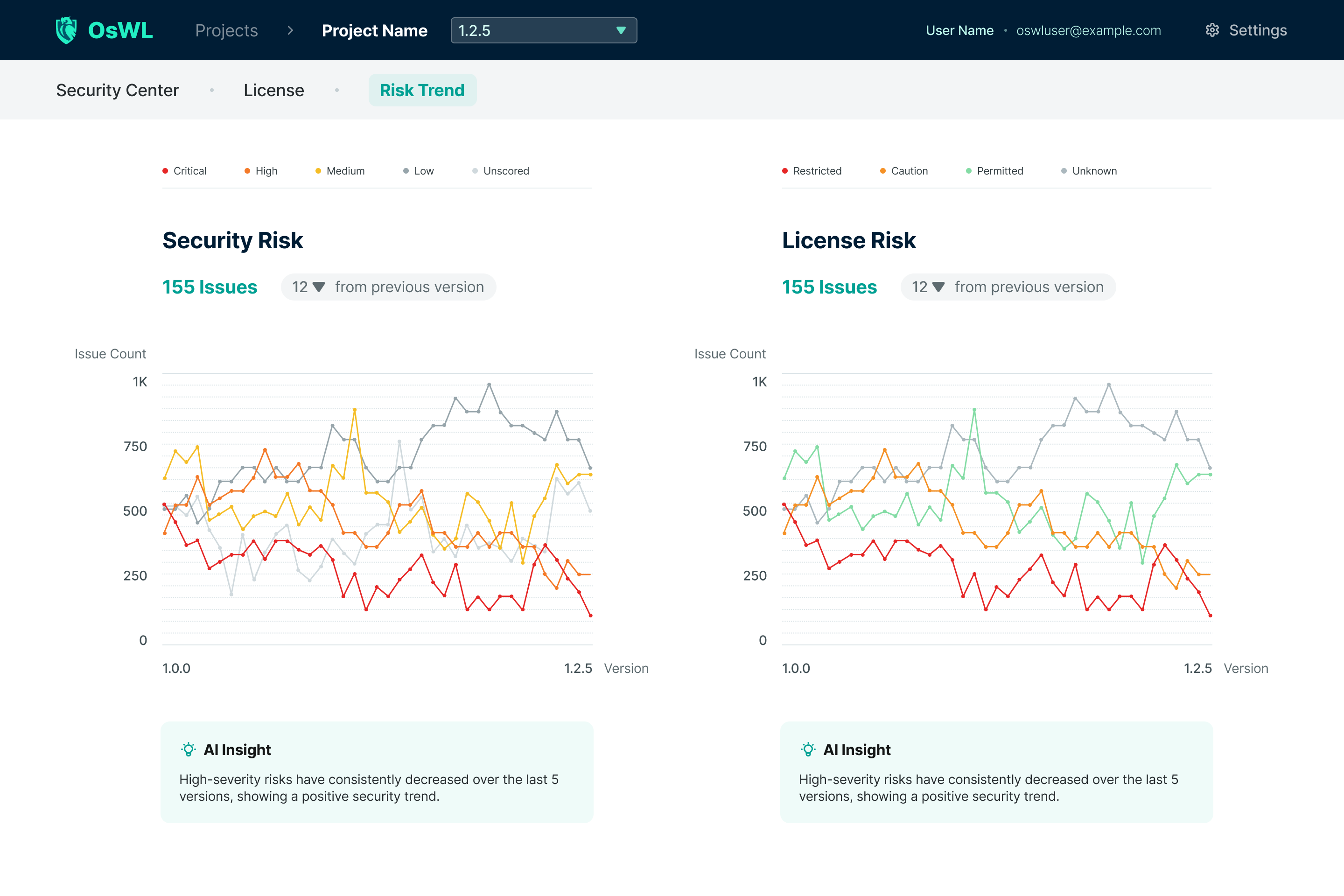
Track CVEs, license obligations, and dependency risks from one self-hosted platform. Scan repositories or submit dependencies from CI, then review findings with your security and compliance teams.
Core Capabilities
Collect dependencies, assess findings, and track remediation with project access controls and audit logs.
Enrich scanned components with vulnerability data, available CVSS scores, and known fix versions. Track review decisions and see a reminder when a component’s deferral period ends.
deps.dev · OSV · GHSAClassify detected SPDX license identifiers against your license policy, review obligations and potential conflicts, and export NOTICE files or SPDX SBOMs for each scan.
GPL · LGPL · Apache · MIT · AGPL · MPLTrack your security posture across scans. Visualize critical, high, medium, and low severity trends over time, with optional AI-generated deviation insights when an LLM provider is configured.
Version-over-version deltaTrace direct and transitive dependencies when supported lock files or graph data provide paths. Coverage depends on the ecosystem and input; a manifest alone may not contain the complete dependency graph.
Maven · npm · PyPI · Go · Cargo · NuGet · RubyGems · ComposerConnect supported GitHub, GitLab, or Bitbucket credentials, or import a public repository URL. Queue repository imports, cancel active jobs, and retain branch information and scan history for each project.
GitHub · GitLab · BitbucketSubmit scans from local projects or CI. The CLI uploads selected dependency manifests and build files for server-side parsing, then submits components with a project-scoped API key and the submitting user’s credentials.
Build-input uploadExport a CycloneDX 1.6 SBOM, a VEX document carrying your triage decisions, or a SARIF report for code-scanning dashboards. Import third-party CycloneDX files to scan components you don’t build yourself.
CycloneDX 1.6 · VEX · SARIF 2.1.0Evaluate scan results against severity, license, and KEV policies. Use a baseline to assess newly introduced findings when needed. CI integrations can publish GitHub checks and PR comments, and Jira integration links findings to issues.
Baseline diff · GitHub check runReview vulnerability and license totals across projects, including unaddressed KEV-listed findings. Projects are ranked by severity counts. Organization and team membership control access; audit logs can be exported separately.
Project risk totals · Teams · Audit exportRun local inference with a separately installed llama.cpp runtime. Qwen3.5-2B Q4_K_M is the default download; Gemma 4 E2B is an optional manual installation. CPU-only defaults require no cloud API key. Prepare the runtime and model in advance for offline use.
llama.cpp · CPU default · Local inferenceImport checksummed OSV, deps.dev, EPSS, and KEV snapshot bundles for offline data lookups. Export a wanted list to target the next bundle and check its data freshness. Configure repository, email, webhook, and AI connections separately for an isolated deployment.
Checksum · Provenance · Wanted-list exportCreate version-bump PRs or MRs for supported manifests in connected GitHub, GitLab, and Bitbucket repositories. Batch actions attempt one PR per eligible component and report individual outcomes. Repository permissions and a supported version edit are required; reviewer assignment depends on the provider.
GitHub · GitLab · Bitbucket · Batch upgradeFlag suspicious package-name similarities and dependency-confusion patterns for review. These heuristics do not prove an attack or establish package provenance. Confirmed malware advisories are tracked separately and can fail the security gate.
Typosquat detection · Dependency confusionConfigure OIDC or SAML 2.0 single sign-on and SCIM 2.0 provisioning. Map identity-provider users to OsWL accounts and manage group assignments. Integration setup and account provisioning are required; OsWL roles and project access still apply.
OIDC · SAML 2.0 · SCIM 2.0Inspect Java bytecode references and supported Python or JavaScript source imports when the corresponding inputs are provided. Evidence and coverage help explain findings. A reference does not prove execution, and incomplete analysis remains unknown.
Java · Python · JavaScript · Coverage evidenceInspect collected Quick Import files for secret patterns and infrastructure configuration issues. Review locations and rules alongside vulnerability findings. Coverage depends on collected files and enabled scanners; full source checkout is a separate option.
Collected files · Rule-based findingsProduct Screenshots
Explore example screens for vulnerability review, project management, license analysis, and risk trends. Screenshots use sample data.
Vulnerability Intelligence
Use CVSS severity, EPSS probability, KEV listings, and known fix versions to prioritize review. Available signals depend on the advisory sources and component coverage; they do not prove exploitability in your deployment.
| Component | CVE ID | CVSS | Severity |
|---|---|---|---|
| jackson-databind 2.13.4 |
CVE-2022-42003 | 7.5 | High |
| logback-classic 1.4.11 |
CVE-2023-6378 | 7.1 | High |
| spring-expression 5.3.25 |
CVE-2023-20861 | 6.5 | Medium |
| guava 31.1-jre |
CVE-2023-2976 | 5.5 | Medium |
| commons-io 2.11.0 |
CVE-2024-47554 | 4.3 | Medium |
Illustrative findings, not an OsWL project scan. CVE links identify the source records; scores can differ by source.
License Intelligence
Compare detected SPDX license identifiers with your policy and review obligations in the context of use and distribution. The example classifications are policy outcomes, not a legal approval.
Workflow
OsWL integrates directly into your existing development workflow. No agents, no heavyweight setup.
Connect a supported VCS account to browse repositories, or enter a public repository URL. Quick Import collects supported files on the OsWL server; build execution is disabled by default.
OsWL parses supported lock files and build manifests, resolves the dependency data they provide, and enriches components with vulnerability and license information.
Review findings in the Security Center, filter by severity, bulk-update statuses, and track your risk posture scan-over-scan in the Risk Trend dashboard.
Submit scans from CI with a project API key and submitter credentials, then evaluate completed results through the gate API or CLI. Configure your pipeline to enforce the returned verdict.
Deploy OsWL on your own infrastructure to review scanned dependencies, track remediation, and manage project access in one place.